OtterFax SMS Consent & Opt-In
OtterFax is a service of Ethden LLC, 7594 SE Youngs St, Hillsboro, OR 97123.
How users opt in
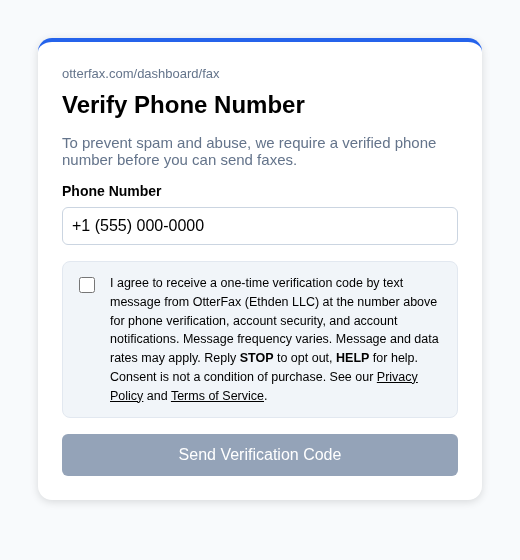
OtterFax never texts purchased or imported numbers. Users opt in on otterfax.com by entering their own mobile number and checking an unchecked-by-default consent box. The send button stays disabled until the box is checked, and the server rejects requests without consent.
- Phone verification (Dashboard → Send Fax, before first fax): user enters their number and checks the box below, then clicks “Send Verification Code”.
- SMS Alerts (Dashboard → Settings → Notifications, paid plans): user selects “SMS Alerts” and checks the alerts consent box before saving.
- Admin alerts: OtterFax staff administrators opt in their own number for internal security/system digests (at most 2 per day).
Exact consent language shown
Message frequency varies. Message and data rates may apply. Reply STOP to opt out, HELP for help. Consent is not a condition of purchase. See our Privacy Policy and Terms of Service.
Message frequency varies. Message and data rates may apply. Reply STOP to opt out, HELP for help. Consent is not a condition of purchase. See our Privacy Policy and Terms of Service.
Sample messages
- Your OtterFax verification code is: 123456
- OtterFax: Your fax "Lease Agreement" was delivered successfully. Reply STOP to opt out.
- OtterFax Admin: Morning security digest – 0 critical events, 3 new signups. Reply STOP to opt out.
Program details
- Message frequency varies. Message and data rates may apply.
- Reply STOP to opt out; reply HELP or email sales@ethden.com / call +1 (209) 609-7399 for help.
- No mobile information will be shared with third parties or affiliates for marketing or promotional purposes.
- Carriers are not liable for delayed or undelivered messages.
- Privacy Policy · Terms of Service